Views, filters, and the radar chart scoring system for Insider Finder.
Insiders are traders with private, confidential, or asymmetric information that is not available to the public. Prediction markets are a tool to create profit from that information. The Polysights Insider Finder is the best tooling available for identifying potential insiders using Polymarket's on-chain data. Our 7 custom-built formulas come together to build a radar chart for a single transaction. A large radar chart means that trade is more likely to be from an insider with asymmetric information.
Insider Finder overview showing the radar chart
Card View
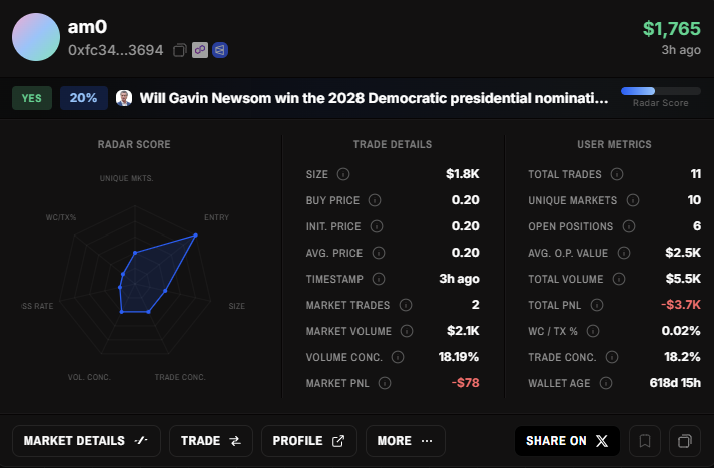
Each card contains a ton of information. Hover over any section in the diagram below to see what it does.
Tap a section below to highlight it on the cardHover or tap any section to learn more
1
Top Left
Username of who placed the transaction, their wallet address, and hot links to Polyscan and Polymarket.
2
Top Right
The size of the transaction (in USDC) and the time it was created.
3
Market Bar
More context on the market traded: the side they bought (YES/NO), the price bought at, which market it was, and the radar score achieved. A higher score means a higher probability of insider activity.
4
Radar Score
The radar chart built from 7 custom formulas. A larger chart means the trade is more likely to be from an insider with asymmetric information. Parameter definitions are all in the Glossary.
5
Trade Details
Metrics specific to this trade: Size, Buy Price, Init. Price, Avg. Price, Timestamp, Market Trades, Market Volume, Volume Concentration, and Market PnL. All definitions are in the Data Dictionary.
6
User Metrics
Overall stats for the trader: Total Trades, Unique Markets, Open Positions, Avg. O.P. Value, Total Volume, Total PnL, WC/TX %, Trade Concentration, and Wallet Age. All definitions are in the Data Dictionary.
7
Action Buttons
Market Details: open the market sidebar to look deeper without leaving the page. Trade: open the trade sidebar to place a position directly. Profile: view the trader's full profile, positions, and PnL. More: copy link, view on Polyscan/Polymarket, and more.
8
Share & Save
Share on X (coming soon). Ribbon bookmark: save this card to come back to later. Copy icon: copy the direct link to this specific trade.
Insider Finder Card Glossary
The radar chart visualizes each trade across 7 key dimensions, providing a quick visual assessment of how "interesting" a trade is. Each axis represents a normalized score from 0-100%.
Unique Markets
High scores indicate focused trading in fewer markets, suggesting conviction. Low scores mean the trader is spread across many markets.
Entry
High scores reward early entries at low prices. Low scores indicate buying closer to 50/50 odds or higher.
Size
High scores indicate large trade sizes ($10k+), showing high conviction. Low scores mean smaller position sizes.
Trade Concentration
High scores mean most of this trader's activity is concentrated in this specific market. Low scores indicate they trade across many markets.
Volume Concentration
High scores mean most of this trader's volume is in this market. Low scores indicate their capital is spread across multiple markets.
Loss Rate
High scores indicate profitable trading history. Low scores mean the trader has significant losses overall.
WC/TX%
High scores indicate the trade happened shortly after wallet creation. Low scores mean the wallet was dormant for a long time before trading.
The overall Radar Score is a weighted combination of these 7 dimensions. Higher scores indicate trades that warrant closer attention.
Card Labels
Cards display coloured status labels based on specific conditions. They are found beside the user profile section on the card.
NEW WALLETWallet was created less than 24 hours ago
HIGH SCORERadar score is above 75%
ARCHIVEDMarket has closed or resolved
SOLDTrader no longer holds a position in this market
Card label examples: NEW WALLET, HIGH SCORE, ARCHIVED, SOLD
Buttons & Controls
The top bar contains the current most popular market categories along with some navigation buttons in the top right corner. Clicking any of the market categories will filter the Insider Finder to only trades made in those markets. To remove the filter, re-select the "ALL" button at the start of the list.
Card View (Default)
Displays insider trades as interactive cards. Swipe left/right or use arrow buttons to navigate. Each card shows a full radar chart, trade details, and action buttons. Click 'Copy Link' to share a direct URL to a specific trade.
Grid View (Tile View)
Displays insider trades in a visual grid layout. Each tile shows the market image, trader name, trade size, outcome, and radar score. Click any tile to open the full card modal with detailed metrics.
Table View
Displays all insider trades in a comprehensive table with server-side sortable columns. Click any column header to sort (click again to reverse, third click to reset). Columns include Size, Price, Entry, Avg, Market Trades, Market PnL, Total Trades, Open Positions, Wallet Age, and more.
Saved Trades
Save trades to your watchlist by clicking the bookmark icon on any card or row. Access all saved trades from the quick filter dropdown. Saved trades persist in your browser's local storage.
Filters Panel
Opens advanced filters sidebar. Filter by trade size range, entry price, wallet age, trade concentration, market PnL, total PnL, open positions, and more. Any metric that we display, you can filter by. All filters are applied server-side for performance.
Open Positions Dropdown
Open Positions
Open Positions - Shows trades where the trader still holds a position (Active Hold = Yes).
All Trades
All Trades - Shows all trades without position filters.
Archived
Archived - Shows trades in markets that have closed or resolved.
High Score
High Score - Shows only trades with a radar score above 70%.